Free app · Mac · Windows · Linux
Switchboard
Everything that needs you, on one screen.
Mail, texts, Teams, calendars, bills, reminders, builds and AI coding sessions, sorted into one board on your own computer. Answer, pay, snooze or approve without opening the other apps.
The first installers are being posted. Until then, the code and release notes are on GitHub.
All downloads
Windows
The installer is not signed yet, so Windows says it protected your PC. Choose More info, then Run anyway.
Mac
Macs with Apple silicon only for now. The first time, macOS refuses to open it: go to System Settings, Privacy & Security, and choose Open Anyway.
Linux
On Ubuntu or Mint, the .deb is easiest: sudo apt install ./Switchboard_linux_amd64.deb in the folder you saved it to. An AppImage downloads without permission to run: right-click it, open Properties, allow it to run as a program, or chmod +x it.
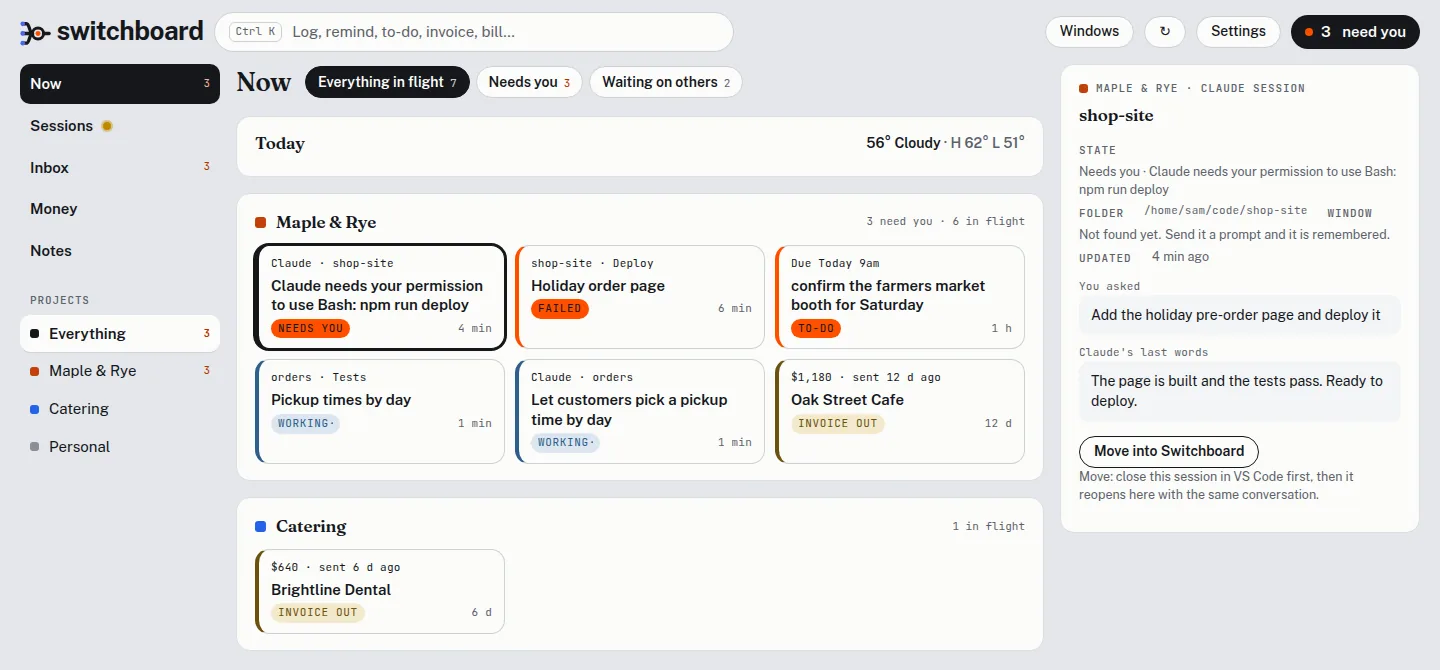
What you can close
the dozen browser tabsthe mail appTeamsthe calendarGitHub's Actions pagethe banking appa terminal per agent
What needs you from each of them still shows up here, as one card, in the right project.
Inbox
Answer without opening the other app.
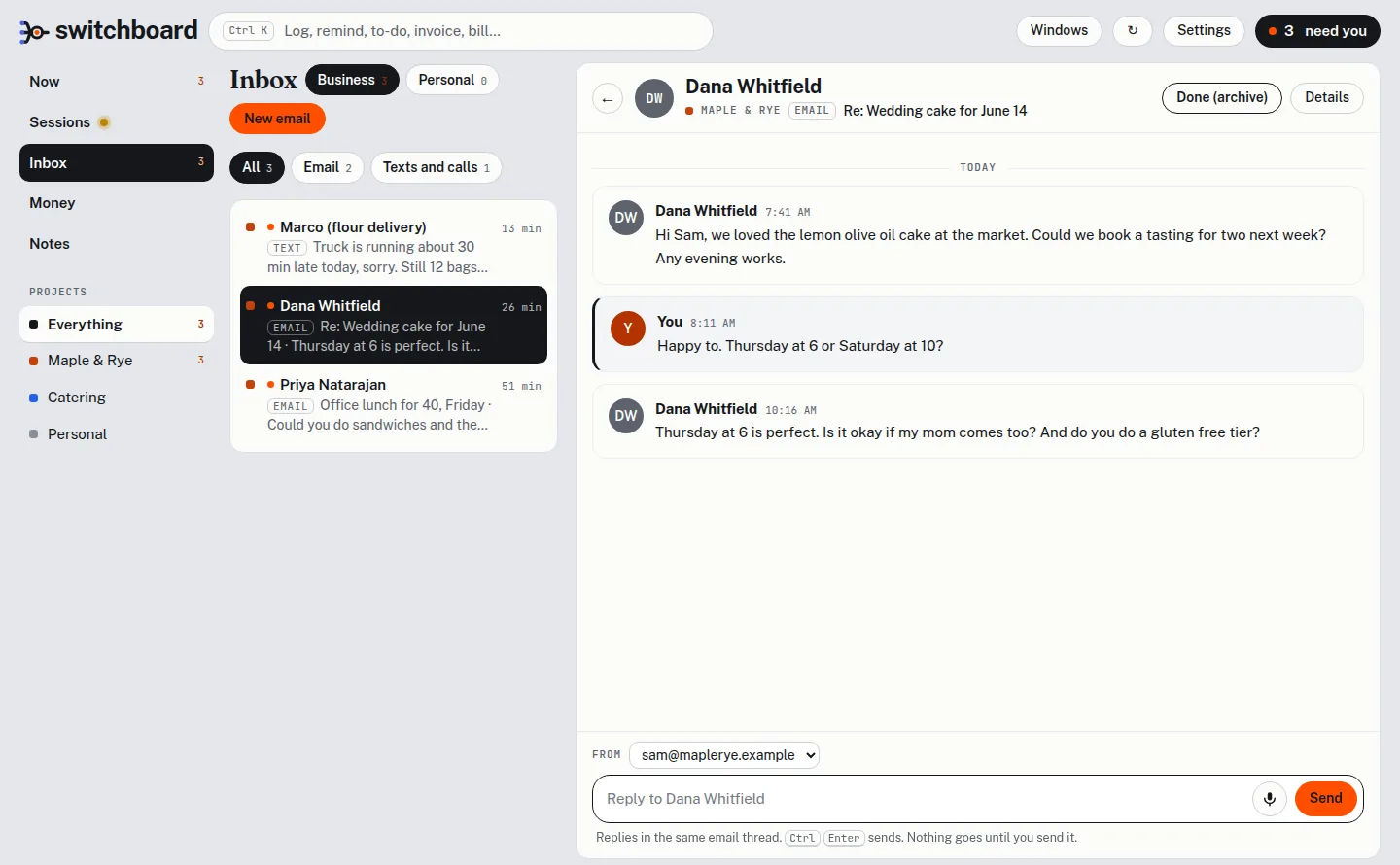
Email from Gmail or any IMAP account, Google Voice texts and voicemail, Teams chats and Outlook, in one list. Pick a conversation and it opens large, with your reply box at the bottom. Reply, archive, snooze, or hand a message to an agent. Nothing is sent until you press Send.
Sessions
Your AI agents, as a chat.
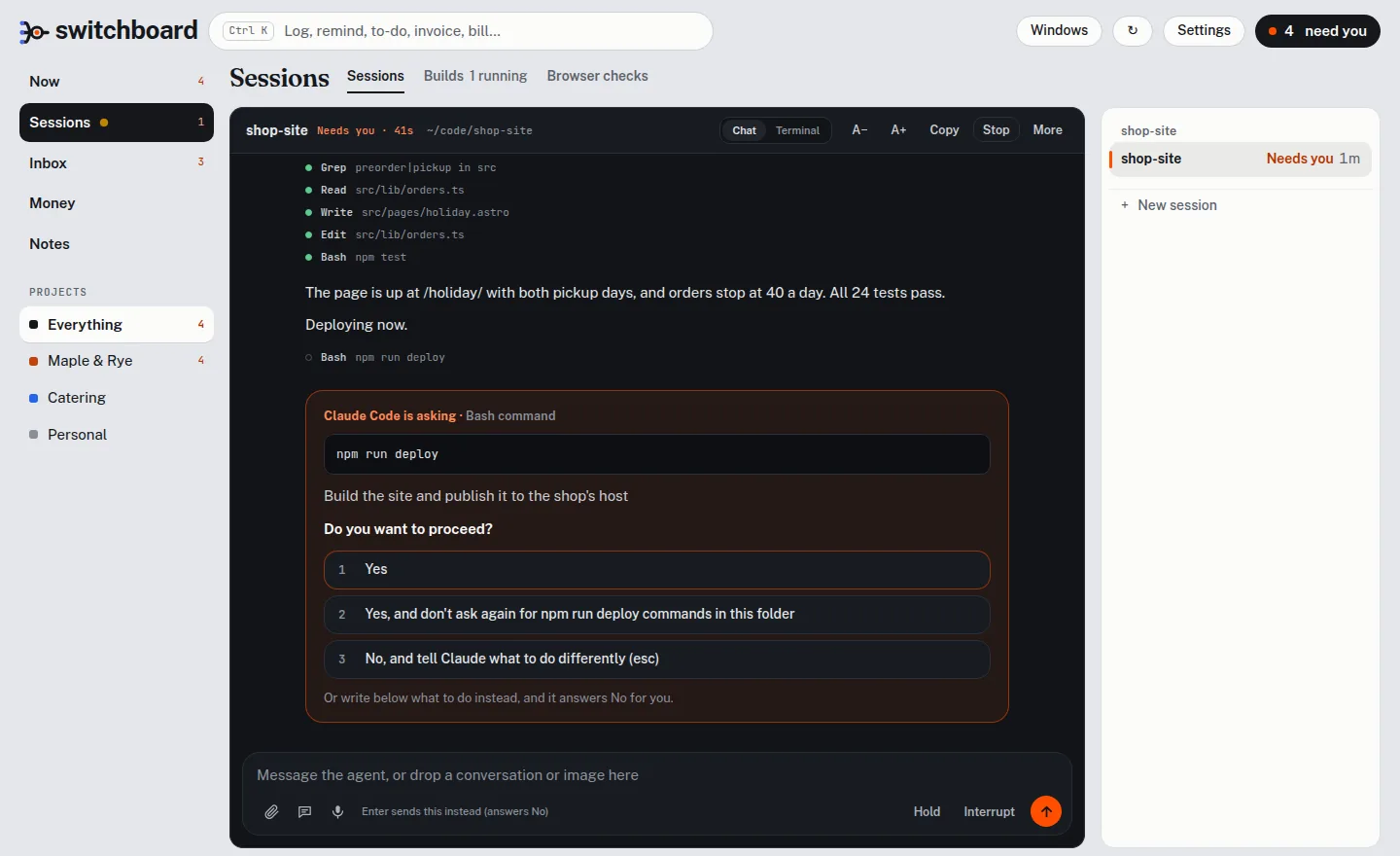
Run Claude Code, Codex, Gemini CLI, Aider or any command inside Switchboard. A Claude session reads as a clean conversation: each tool call folded to one line, and its permission questions turned into buttons. Messages wait in a queue and go in when the agent is free. Sessions on your other computers show up too, and an agent that gets stuck puts a card on your board.
Ctrl K
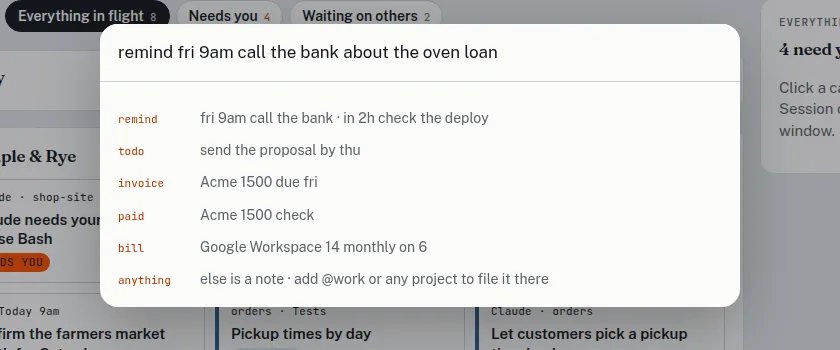
Type it once.
Press Ctrl K and type remind fri 9am call the bank, bill rent 1200 on the 1st, todo send the proposal by thu, or anything else as a note. Chores that come back on their own, like feeding the animals at 6 every day, work the same way. They show up as cards when they are due.
Money
Money, without the banking app.
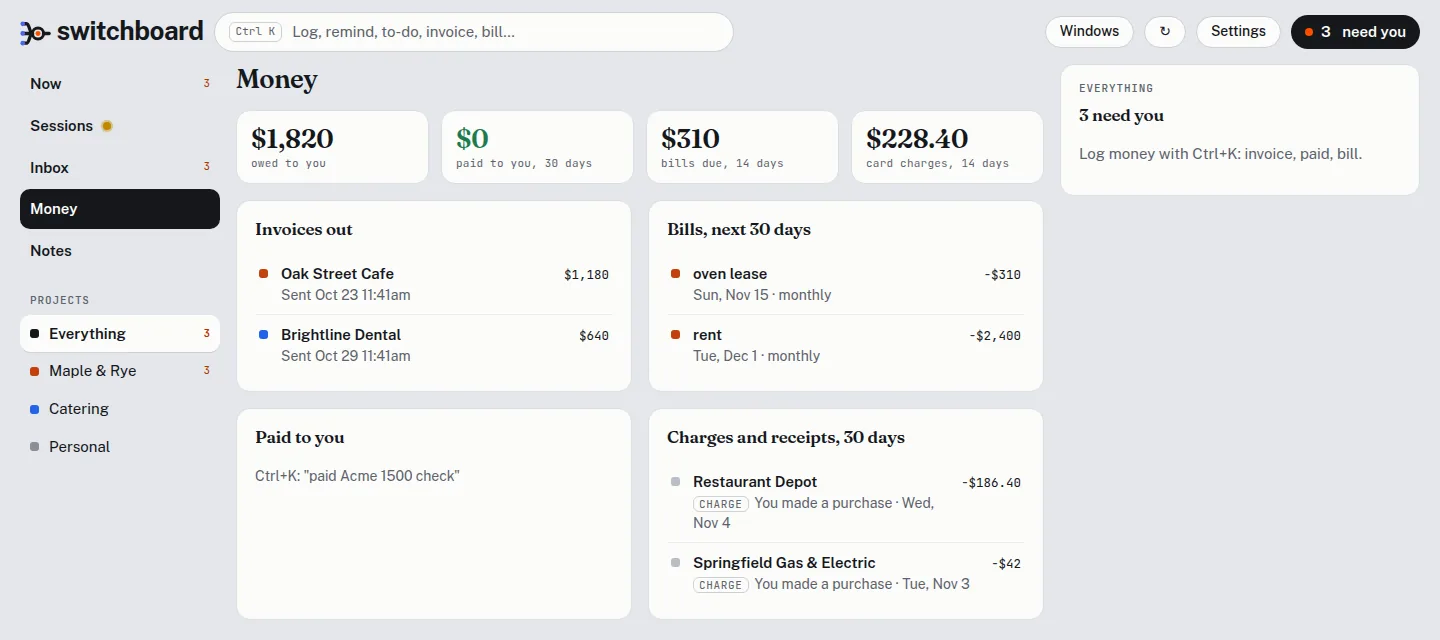
Invoices you sent and are still waiting on, bills and when they are due, and card charges and receipts read from the alert emails your bank already sends. It never needs your bank login.
System
See what your computer is doing.
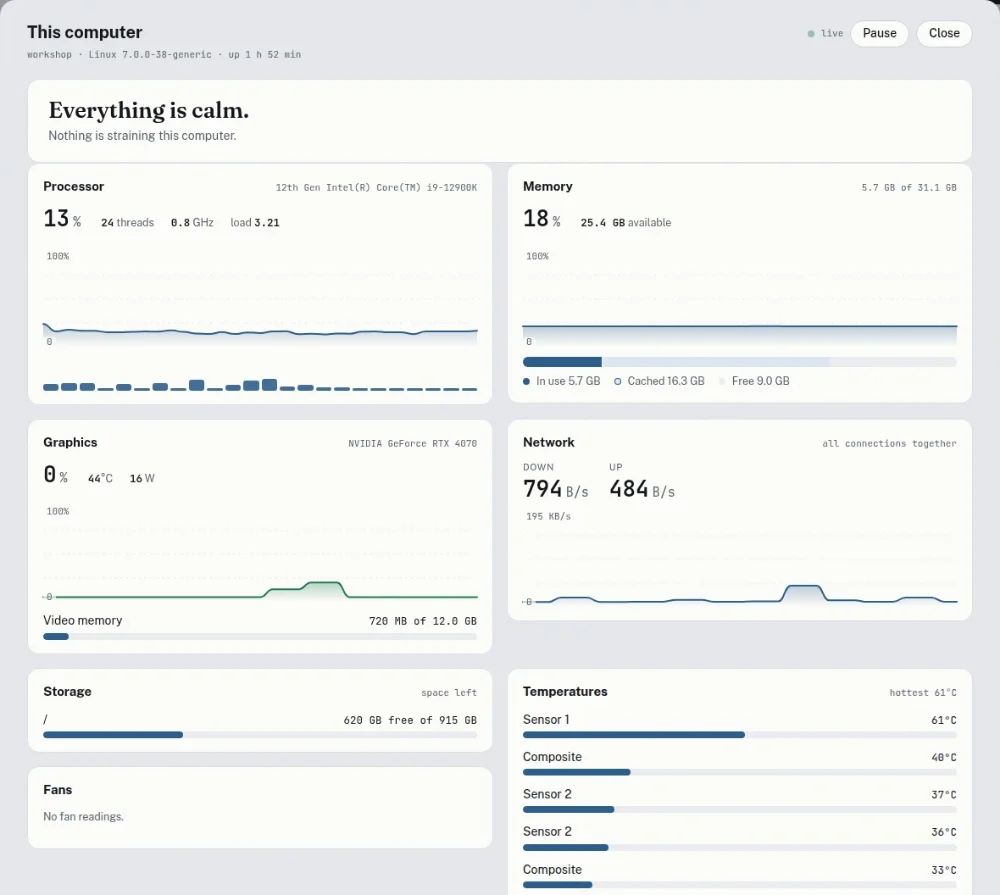
The System monitor shows the processor, memory, graphics, network, storage, temperatures and the apps using the most, with one sentence at the top saying what is slowing things down. It only reads while it is open, keeps no history and never asks for admin rights.
And the rest
- Builds
- GitHub Actions, live. Re-run a failed job or cancel one from the board.
- Calendar and weather
- Today's events from any calendar's private link, and the forecast for your town.
- Notes
- Pages per project, checklists, #tags, and a line that adds itself up when you end it with =.
- Packages
- Deliveries read from the shipping emails already in your mail.
- Browser checks
- Load a page every hour and get a card when the words you expect are gone.
- Webhooks
- A private link that Zapier, IFTTT, Home Assistant or a script can post cards to.
- Every computer
- An optional encrypted account links your computers. Notes and settings follow you.
How it works
Install it
Download the installer and open it. The app brings everything it needs and starts with your computer.
Connect what you use
Mail with an app password, Microsoft with a sign-in, calendars with their private links. Each connection runs from your computer straight to the service.
Work from one screen
Switchboard checks each source on its own schedule and puts a card on the board when something needs you. Clear it and it stays gone until something new arrives.
Private by design
Switchboard runs on your computer, not on a server of mine. Your mail passwords are locked with a key kept in your computer's keychain. It listens only on your own computer, and a web page open in your browser cannot drive it. There are no ads and no tracking. What leaves is what you connect: your mail provider, weather for the town you enter, GitHub for updates, and, only if you make an account, encrypted sync that I cannot read. Read the privacy notes.
Free, and Fair Source
You can download it, use it and read every line of it for free, at home or at work. The licence stops anyone from turning it into a competing product, and each release becomes plain MIT two years after it ships. Read the licence.
Early days
This is version 0.1. I built it for my own day and use it every day on Linux. The Mac and Windows apps are new and lightly tested, so expect rough edges, and tell me what you run into.
Questions
Is it really free?
Yes. No price, no trial and no ads. An account is optional and only links your computers.
Where does my data go?
It stays on your computer, in one file only your user can read. Each service you connect talks to your computer directly. Nothing passes through a server of mine, except encrypted sync if you turn it on, and I cannot read that.
Which computers does it run on?
64-bit Windows, Macs with Apple silicon, and 64-bit Linux (.deb or AppImage). An Intel Mac can run it from the source code until it gets its own installer.
Do I have to use AI?
No. Mail, chats, calendars, bills, reminders and notes work on their own. The agent sessions are there if you use them, and Switchboard never runs AI over your mail or messages.
What does version 0.1 mean?
It works, I use it every day, and it will change quickly. The Mac and Windows apps are new. Updates come from GitHub, and it asks before it installs one.
Can my business use it?
Yes. Anyone can use it, at work too. The only thing the licence rules out is building a competing product from it.
Something wrong, or an idea? Write to support@brettboggs.dev. I read all of it.